Cutting listed LED strip at the marked cut points, then connecting and sealing the cut as the maker’s instructions say, does not by itself void the listing, according to the sources we found. Cutting between marks, lengthening past the limit, or swapping the driver can leave the finished system outside what was tested. The authority having jurisdiction decides.
A typical call comes from the electrician: the reel is listed, the run is 11 ft 4 in, the marked cut points fall at 11 ft and 11 ft 5 in, and the inspector has asked for the listing paper. The question is what the electrician is allowed to do before the paper stops applying. The answer is a list of changes and which side of the listing each falls on.
What a Listing Covers
A listing applies to a product as evaluated. For a strip sold as a low-voltage lighting system, the standard is normally UL 2108, with UL 8750 parts inside, as our guide to UL 2108, UL 8750 and UL 1598 explains. The file names the models, the voltage, the power unit that goes with them and the location rating, and the maker’s instructions say how the product may be installed.
So the listing is not a property of “the strip”. It is a property of the product, used the way the file and the instructions describe. Cutting, connecting and powering the strip are all part of the instructions for a product that is sold as cuttable. A change outside the instructions is a change outside the evaluation, and that is where a listing stops helping.
What the Sources Say
The sources agree on a pattern and disagree on the wording.
- UL. UL’s article on the December 2019 revisions to UL 2108 says field cuttable Class 2 luminaires, typically LED flexible circuit boards, will require certain markings to be repeated at intervals so the markings remain present on pieces cut from a larger roll. The revisions apply to new submittals or revised products from December 6, 2021. The article does not discuss cut points, so it does not say where a cut may be made. It does show that a product can be designated as field cuttable and that cut pieces keep their markings.
- Makers. Maker spec sheets list a “UL Listed Field Cuttable” designation, with a stated cut interval, as a product feature. The designation belongs to the model, not to the category.
- Vendors. One vendor’s knowledge base says cutting a listed strip to length does not nullify the listing and recommends asking a local fire code expert. A retailer says that cutting a different kind of product, a rope light spool, in the field voids its listing. Neither is an authority on the standard.
We did not find the clause text in UL 2108 on field modification, so we do not quote one. The working rule from these sources is narrower and safer: the listing holds for a product designated as cuttable, cut where it is meant to be cut and finished as instructed. Anything past that needs the maker’s or the inspector’s answer.
Cutting at the Marked Points
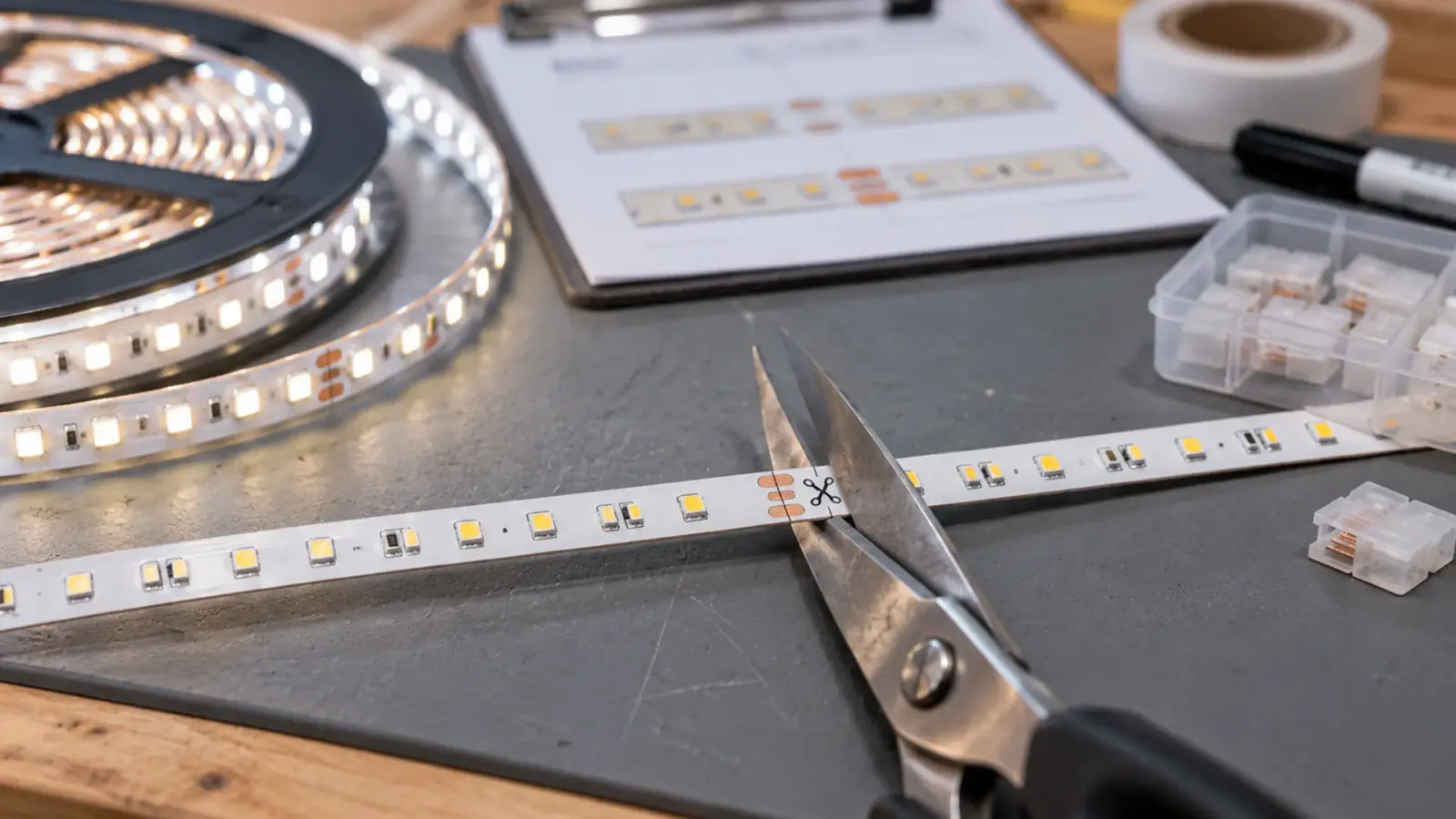
A marked cut point is the printed line where the circuit allows a cut. A strip cut there still has working segments on both sides. A strip cut between marks leaves a segment without a complete circuit, which is a damage and not a listing question. Our cut and connect guide covers how to find the point, and our warranty policy lists cuts outside marked cut points as physical damage.
The check before cutting is on the paper: does the listing file show this model as field cuttable? A strip sold as a fixed length, a sealed strip with a fused end, or a product with no cut marks is a different case. On our site the rule is the same for every model: certification coverage varies by model and belongs to the product and its original manufacturer, so send the SKUs and we match the certificate documentation to the exact models.
Connecting and Sealing
A cut needs a connection and, on sealed strip, a sealed end. The maker’s instructions say which connectors or solder method are allowed and how a sealed cut is closed. A connector that is not in the instructions, a solder joint on a strip that calls for a clip, or a sealing method that leaves the cut open is a change outside the instructions. Our warranty policy treats cutting at the marked points, then wiring and sealing each cut as shown in the instructions, as normal, and treats unapproved field repairs and re-soldering as unauthorized modification. The two sources point the same way: follow the instructions, and the cut is not a modification.
On sealed strip, the end matters for the location rating as well. Our sealing guide covers it. A listed wet-location strip with an unsealed end is not the product that was evaluated.
Changes That Leave the Listing
The table sorts common field changes by whether they stay inside what the instructions describe.
| Change | Usually inside the listing? | Why | What to check |
|---|---|---|---|
| Cut at a marked point, connect and seal as instructed | Yes, for a field-cuttable model | The instructions provide for it | The file shows the model as field cuttable |
| Cut between marked points | No | Not an instructed cut | Use the marked point or choose a free-cut model |
| Different connector or solder method | Not unless the instructions allow it | Outside the instructions | The instruction sheet |
| Run longer than the stated limit | No | Outside the tested electrical limits | The max run on the spec table |
| Different driver than the one specified | Not unless the file allows it | The listing names the power unit | The file and the strip’s data sheet |
| Added channel, cover or enclosure | Check | The assembly changes heat and exposure | The maker’s instructions |
| Different dimmer or control | Check | Compatibility is part of the system | The driver’s dimming interface |
| Longer or thinner secondary cable | Check | Class 2 wiring has its own marking and limits | Our NEC checklist and the cable marking |
A “check” row is where the answer is on the paper and not in the product. If the paper does not answer, the maker or the inspector does.
Why the Sources Disagree
The vendor answers differ because the word “cut” covers different products and the word “modified” covers different acts. A strip made to be cut every inch and a rope light spool made as one length are different products with different listings, and the same sentence cannot be true of both. A cut at a marked point and a cut anywhere are different acts. A vendor answering a general question gives the general answer, and the inspector is asking about one installation with one file number. Read each answer for the product and the act it describes before you apply it.
Changing a Driver or a Control
The driver is the part most often replaced on a retrofit, and it is also the part the listing names. Our warranty policy treats incorrect driver pairing as electrical misuse, and the listing treats the power unit as part of the system. A replacement driver that matches the voltage and the load can still be a different listed part, and a driver that is not Class 2 changes the wiring rules, as our Class 2 guide explains.
Controls follow the same pattern. A dimmer that is not on the driver’s compatibility list can flicker or fail, and it is also a change to the system. Before a swap, read the driver’s data sheet for its dimming interface and the compatibility list, and write down the change.
After a Retrofit
A retrofit is a sequence of small changes: a new driver, a replaced section, a control added later. Each is a place where the system differs from the listing file. Review the system after the last change, not after each one:
- Compare the installed strip, driver and control against the listing file.
- Check the cut points, connectors and seals against the instructions.
- Confirm the run lengths and the driver load against the spec table.
- Record every substitution with the date and the part number.
If any line does not match, ask the maker whether the change is covered, in writing, before the inspector asks.
A Typical Retrofit Sequence
A four-year-old corridor cove shows how the changes pile up. In year two a driver fails and a different make is fitted. In year three a dimmer is added. In year four a damaged section is cut out and a new piece from a later reel joined in. Each change is small and each is documented nowhere. When the inspector asks for the listing after the last change, the installed system is a driver the file does not name, a dimmer nobody tested with it and a section from another batch, and the listing paper describes none of it.
The review that fixes this takes an hour. List what is installed, compare it with the file, and mark each difference as covered, not covered or unknown. Then get an answer on each unknown from the maker, in writing, and keep it with the file.
What to Ask the Maker
Ask these questions in writing, and keep the answers.
- Does the listing file show this model as field cuttable, and at what interval?
- What connectors, solder method and sealing are allowed at a cut?
- Which drivers does the file name or the data sheet list as compatible?
- Is the run limit on the spec table the tested limit?
- Is the assembly with this channel and cover covered, or is it up to the AHJ?
- Can the maker confirm in writing that a specific change is within the instructions?
A maker that cannot answer is telling you something. The inspector may ask the same questions.
When the Answer Is No
Sometimes the change is outside the listing and the maker will not cover it. Then the choices are to restore the listed system, replace the run with a listed product that fits the new need, or take the question to the AHJ with the facts and ask what they will accept. A listed finished fixture is a different path with its own listing, as our listing guide explains, and a replaced run is cheaper than a failed inspection after the ceiling is closed.
The Inspector’s View
Whether a listing is required, and which marks are accepted, is a code and AHJ question, as our NEC checklist explains. An inspector who asks for the listing wants the certificate, the file number and proof that the installed system matches. A cut strip that is cut at the marked points and finished as instructed gives the electrician an easy answer. A swapped driver or a longer run gives a harder one. When in doubt, ask the AHJ, and get the answer in writing.
FAQ
Does cutting LED strip void the UL listing?
Cutting at the marked cut points of a strip designated as field cuttable, and finishing the cut as the maker’s instructions say, is part of how the product is meant to be installed. Cutting between marks or changing the system is outside the instructions. The inspector and the maker decide.
Does soldering a cut void the listing?
Not if the maker’s instructions allow soldering for that product. A solder joint on a product that calls for a connector is a change outside the instructions, and our warranty policy lists unapproved re-soldering as unauthorized modification.
Does replacing the driver void the listing?
It can. The listing names the power unit, so a replacement should match the file. A driver of a different make or class changes the system, so check the file and the compatibility list before the swap.
Who decides whether a modified strip is acceptable?
The authority having jurisdiction. The maker can say whether a change is within the instructions, and the inspector decides whether to accept the installation.
What to Keep on File
- The listing certificate and file number for the strip and the driver.
- The model numbers in the file and the installed model numbers.
- The cut and connection instructions for the model.
- A log of cuts, substitutions and added parts with dates.
- The AHJ’s answer, in writing, on any change that was in doubt.

Unitop Lighting supplies strip, drivers and controllers for commercial projects across the US. Certification coverage varies by model and belongs to the product and its original manufacturer. Send the SKUs with your quote request and we will match the certificate documentation to the exact models.