LED tape joins a Lutron, Crestron or Control4 system through an interface, never directly. The control system sends a signal (phase dimming, 0-10V, DALI or DMX), and a driver or decoder that understands that signal powers the tape. Choose the signal first, then the driver, then the tape, and settle who programs it before anything is ordered. A wireless link adds a gateway and a login, and which LED strip controller survives a commercial handover sets five gates for it.
Five decisions settle it:
- Which system owns the lighting scenes.
- Which signal leaves that system for each zone of tape.
- How many channels each zone needs: one for dimming, two for tunable white, three or four for color.
- Where the drivers and decoders will live and how they are reached.
- Who wires it and who programs it.
Gate 1: Which System Owns the Scene
On most projects one system is the lighting control and another is the whole-building automation. Lutron is often the lighting system; Crestron or Control4 often runs audio, video, shades and scenes across all of them. The tape belongs to whichever system controls the lighting loads, and the automation system talks to that system rather than to the tape.
According to CE Pro’s 2020 report, Crestron Home automatically detects Lutron RA2 Select, RadioRA 2 and HomeWorks QS/QSX hardware, and Lutron lighting scenes can be recalled together with climate, audio and video. Lutron has also shown RadioRA 2 working with Control4 touchscreens. So a common layout is: tape on Lutron controls, Lutron integrated into Crestron or Control4.
The other layout puts the tape on the automation system directly, through its own dimming modules or a lighting gateway. Both work. What does not work is leaving the question open until the tape is on site.
Gate 1 decided: you can name the system that switches and dims each zone.
Gate 2: Which Signal Leaves the System
Four signals cover almost every commercial job:
| Signal | What it needs at the tape end | Best for |
|---|---|---|
| Phase dimming (forward or reverse) | A phase-dimmable driver set to the same phase | Retrofits with two wires to the box |
| 0-10V | A 0-10V driver, or a 0-10V decoder after a constant-voltage driver | New work, single color, simple zones |
| DALI (DT8 for tunable) | A DALI driver or a DALI controller after the driver | Large buildings, per-zone addressing, tunable white |
| DMX512 | A DMX decoder after the driver, plus a DMX gateway or output on the system | Color, animation, venues |
Our controller line covers each path: the UT-C010-350 0-10V decoder handles up to 350 W, the UT-CDALI-DT8 drives two tunable channels up to 360 W on a DALI bus, and the UT-CDMX-480 DMX512 decoder handles four channels up to 480 W. Our 0-10V vs TRIAC vs DALI guide compares the first three in depth, and SPI vs DMX covers color tape.
Gate 2 decided: every zone of tape has one named signal.
Lutron: Phase Dimmers and 0-10V Through Its Own Modules
Lutron systems dim tape in two ways. Wall dimmers and power modules cut the phase of the line voltage to a phase-dimmable driver; 0-10V modules and controls send a low-voltage signal to a 0-10V driver. The pairing rules for the phase path, which are where most Lutron flicker comes from, are the subject of our companion guide on pairing LED tape with a Lutron dimmer.
Lutron also makes its own products for tape. According to one review, Lutron’s Lumaris tape is tunable from 1800K to 4000K and pairs with RadioRA 3. When a specification calls for it, the system and the tape come from one maker. When it calls for tape from another supplier, the interface is a driver that matches the Lutron module’s output.
For 0-10V, our UT-D60-24-C2-010 is a 60 W Class 2 driver with 0-10V dimming on 120 to 277 V input, and the UT-D96-24-010 does the same at 96 W. Both follow a standard 0-10V signal; set the control and the driver to the same sink or source convention.
Crestron: 0-10V, DALI or DMX Through an Interface
Crestron systems usually reach tape through a dimming or 0-10V module, a DALI interface, or a DMX gateway. Which one depends on the processor, the modules already in the design and the integrator’s preference, so the right move is to ask the integrator which output each lighting zone gets and what interface sits at the end of it.
For single-color tape on Crestron, 0-10V is the simplest path. For tunable white, DALI DT8 carries color temperature as a native command, which is why a DT8 controller is often the cleanest interface. For color tape, a DMX output feeds decoders like the UT-CDMX-480 after constant-voltage drivers. Where Crestron already integrates a Lutron system, as CE Pro describes, the tape can stay on Lutron and Crestron recalls the scenes.
Control4: Through Lutron or an Interface
Control4 projects often use Control4’s own lighting or a Lutron system integrated through drivers in the Control4 software. For tape, the same rule applies: find out which device does the dimming and match the driver to its output. If that device is a Lutron module, follow the Lutron path. If it is a Control4 dimmer or a third-party interface, read that device’s output and load limits.
Third-party controllers fill the gaps. According to Luxor’s integration page, its outdoor lighting controller integrates with Lutron, Crestron, Control4 and Savant, which is typical of how specialist lighting controllers attach to these platforms: the controller runs the tape, and the platform sends it commands.
Gate 3: Tunable and Color Need More Channels
A dimmed single-color zone needs one channel. Tunable white needs two: brightness and color temperature, or warm and cool. Color tape needs three or four.

This decides which tape you order. Our tunable white LED strip comes in two control architectures. 2-wire strips carry dimming and CCT over the power line and drop into retrofits without new control wiring, but they need their matching controller. 3-wire strips have a dedicated CCT channel and are the ones to use with 0-10V, DALI and DMX systems. On a Lutron, Crestron or Control4 job, the 3-wire version is almost always the right one, because the system needs two separate controls to drive it.
If the design only wants the tape to warm as it dims, dim-to-warm strip does it on one channel and saves the second control entirely.
Gate 3 decided: each zone’s channel count matches both the tape and the system output.
Gate 4: Where Drivers and Decoders Live
Control systems put their modules in an electrical or AV room. Tape drivers and decoders end up wherever the electrician puts them, often above a ceiling near the tape. Both choices have costs: a central room makes service easy but lengthens the low-voltage runs; a local driver keeps the runs short but hides the device.
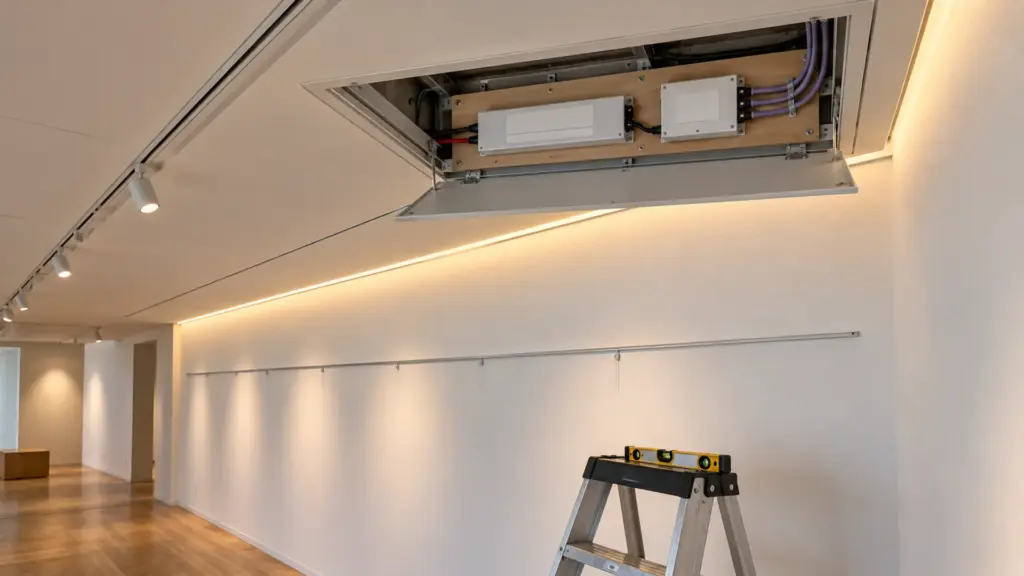
Settle it on the drawings. Decide where each driver and decoder goes, how the signal wiring reaches it, and how it is reached for service. Keep 24V runs short enough to control voltage drop, and keep drivers out of sealed, hot spaces. Label each driver with its zone and its system address; the integrator will need both.
Control Wiring Is Part of the Lighting Job
Each signal brings its own wiring rules, and they are where integration jobs lose days on site.
- 0-10V is a separate low-voltage pair from the control to every driver in the zone. Polarity matters: purple to purple, gray to gray. Keep it separated from line-voltage conductors as the wiring method and the code require, and do not share one pair between zones that should dim separately.
- DALI runs on a two-wire bus that can share a cable with the mains in many installations and is not polarity sensitive on most devices. Each driver or controller gets an address during commissioning, so the bus can be wired as a daisy chain without planning every zone into the wiring.
- DMX512 runs as a daisy chain from the gateway through each decoder, with a terminator at the last device. Star wiring and long unterminated runs are the usual cause of flicker on color tape that looks like a driver fault.
- Phase dimming uses the line-voltage wiring itself, which is why it suits retrofits and why the neutral and the load limits matter so much.
Put the control wiring on the electrical drawings, not just in the integrator’s documents. The electrician prices from the drawings, and a missing control pair is a change order.
What the Integrator Needs From You
The integrator programs from a schedule. Hand over one line per zone with the information below and commissioning goes quickly; leave it out and someone guesses on site.
| Item | Example |
|---|---|
| Zone name and location | Boardroom ceiling slot |
| Signal and address | DALI, address 12 |
| Tape model and channel count | 3-wire tunable, 2 channels |
| CCT range the design allows | 2700K to 5000K |
| Driver or decoder and location | DT8 controller, ceiling access panel 3 |
| Low-end trim, if tested | 5 percent |
| Scenes it belongs to | Meeting, presentation, evening |
The CCT range line matters more than it looks. A tunable tape that runs from 2700K to 6500K can be told to go to 6500K by a keypad button nobody meant to press. If the design wants the boardroom to stay between 2700K and 5000K, the integrator can limit it, but only if someone writes the limit down.
Gate 5: Who Programs and Who Wires
The most expensive integration problem is a scope gap. The electrician installs the tape, the drivers and the control wiring. The integrator programs the system, the scenes and the keypads. Between them sit the addresses, the dimming curves, the low-end trims and the color temperature limits. If nobody owns those, the tape works on the day of handover and nobody can say why it flickers at 5 percent.

Write the split into the scope before pricing. It is one line in a quote that keeps its margin, and it saves a week at commissioning. Ask for one test zone early: the integrator programs it, the electrician wires it, and both sign off that it dims, tunes and goes dark the way the design wants. Our driver and dimmer compatibility test gives the checks.
Common Integration Failures
| What happens on site | Usual cause | Prevention |
|---|---|---|
| Tunable tape only dims, never changes color | 2-wire tape on a system with two separate channels | Order 3-wire tape for system control |
| Tape flickers at low levels on a phase module | Driver phase or minimum load wrong | Match the driver to the module’s phase and load |
| Color tape glitches or flashes | DMX line unterminated or star-wired | Daisy chain with a terminator |
| A zone does not respond | Address missing or duplicated | Address schedule handed to the integrator |
| Tape goes cooler than the design | No CCT limit programmed | CCT range on the zone schedule |
Before You Order
- The controlling system for each zone is named.
- Each zone has one signal: phase, 0-10V, DALI or DMX.
- The driver or decoder matches that signal and its load limits.
- Tunable zones use 3-wire tape on two channels, or dim-to-warm on one.
- Driver and decoder locations, labels and addresses are on the drawings.
- The scope says who wires, who programs and who sets the trims.
- One test zone is commissioned before the rest is released.
We supply LED tape, drivers and decoders for projects run on Lutron, Crestron and Control4 systems. Send the lighting zones and the control schedule from the integrator, and we will match each zone’s driver or decoder to its signal and confirm the channel count before release: request a quote. Driver and controller ratings are on our drivers, controllers and connectors page.