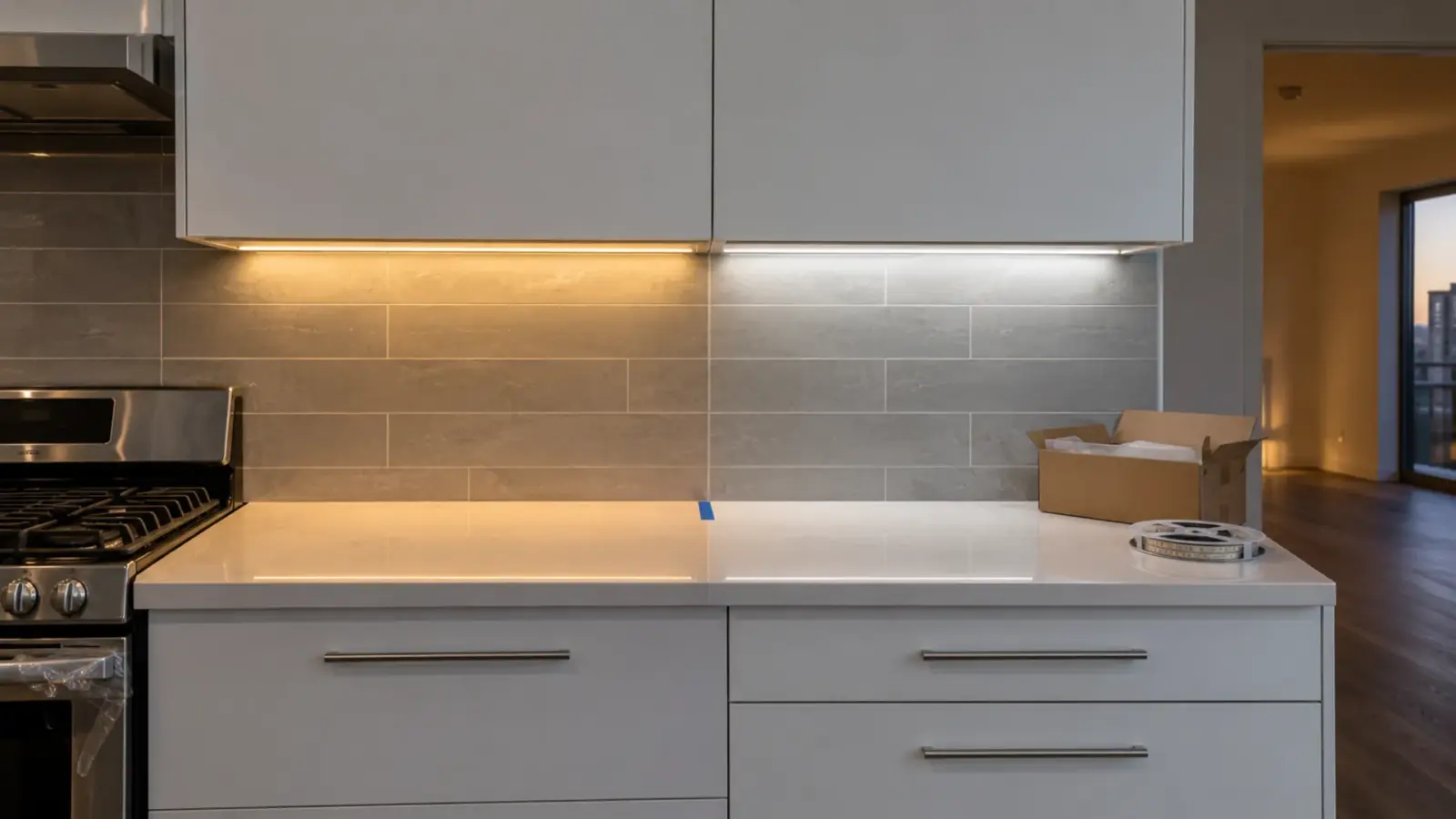
Why doesn’t the second reel of LED strip match the first? Usually because it came from a different bin or a different production lot, and nothing on the order said it had to match. The fix is a number on the specification, Color-consistency steps (MacAdam ellipses). Fewer steps means two strips from different reels look like the same white; 3-step is hard to tell apart by eye., and three lines on the purchase order that keep every release tied to an approved sample.
The seam shows in the same places on every job: a cove where the reorder meets the original, a shelf where one section looks faintly pink, a slot where the far half is a shade greener than the near half. This page works through why it happens and how to write it out of the job.
Why Two Reels Differ
LED packages leave production with a spread of color. Makers measure each one and sort them into bins (binning, in the glossary), and the strip maker builds a reel from one bin or a few. According to LEDRise, one maker’s warm white packages spanned roughly 2,580K to 4,260K before sorting, which is why sorting exists at all.
Two reels can still differ for five reasons:
- Different bins. According to LuxeonStar, a reel is typically built from a single bin; tape cut from several reels can mix bins in one order.
- Different production lots. The same bin code from a later lot can sit in a slightly different place inside the tolerance. On a phased job, the second delivery is often a later lot.
- Loose tolerance within a reel. WAC Lighting’s support notes separate within-reel mismatch, usually from loose manufacturing tolerance, from between-reel mismatch, which comes from batches, bin selection or measurement calibration.
- Heat. LuxeonStar notes that white LEDs shift color as they warm, and suggests comparing strips after they have run for ten minutes or more. A section in a tight channel can look different from one in open air.
- Age. WAC Lighting also notes that a section replaced after years of use can differ from its neighbors even when both came from the same batch, because the installed strip has shifted.
The first three are what SDCM and the purchase order control. The last two are about installation and maintenance.
What an SDCM Step Measures
SDCM, the standard deviation of color matching, is the size of a color tolerance measured in MacAdam steps. A one-step ellipse is the zone around a target color inside which most observers cannot tell two lights apart. A three-step ellipse is three times as large in each direction, a five-step ellipse five times. A brand color is a different problem, because it is a target in a color space rather than a match between two reels; brand color matching with RGBW strip covers it.
What the steps mean in practice, as the sources describe them:
- 1–2 steps: differences hard to see even side by side.
- 3 steps: the usual target for architectural work.
- 5 steps: WAC Lighting calls it generally acceptable; differences can show between adjacent sections.
- About 7 steps: according to any-lamp and Photometric Testing, roughly the size of the ANSI C78.377 tolerance box for a nominal CCT. “3000K” with no SDCM stated tells you little more than that.
Sources disagree on exactly where a difference becomes visible, two steps or three. Treat the grades as ranges, and let the mounting decide how tight you need to be.
How Big a Step Looks on a Job
The same tolerance can be invisible in one detail and obvious in another. What matters is whether the eye sees two sections side by side, how much the cover blends them, and how long people look.
| Mounting and sightline | What the eye compares | Tolerance that usually keeps the seam hidden |
|---|---|---|
| Bare strip or clear cover in a continuous line at eye level | Adjacent sections directly | 3 steps or tighter |
| Opal cover in a continuous slot or channel | Adjacent sections, partly blended | 3 steps |
| Indirect cove washing a ceiling | The lit surface; sections overlap on it | 3 to 5 steps |
| Separate runs in separate rooms | Memory, not adjacency | 5 steps |
The right-hand column is our judgement from the sources above, not a standard. A deep opal cover hides dots; it does not hide color, because the two sections still sit side by side. Our diffuser guide covers what each cover does.
SDCM, CCT Tolerance and Duv Are Not the Same Number
Three different numbers describe “how white” a strip is, and a spec can be tight on one and loose on another.
| Number | What it describes | Why it matters for matching |
|---|---|---|
| Nominal CCT (3000K) | The target color temperature | Two strips at “3000K” can still differ visibly |
| SDCM | How far the LEDs may stray from the target | The number that controls seams |
| Duv | Distance above or below the blackbody line | Shows as a green or pink tint at the same CCT |
Duv is the tint you notice when two strips at the same CCT look different: one slightly green, one slightly pink. According to Waveform Lighting, a Duv difference above about 0.002 becomes noticeable. Ask for Duv when tint matters, for example in a retail case or a white plaster cove.
CRI is a fourth number, and it does not describe matching at all. Two strips can share a CRI of 90 and differ in tint. Our high-CRI guide covers what CRI does tell you.
What Binning Does, and What It Does Not
Binning sorts LED packages by color, output and forward voltage before they go on the board. A tighter bin means a larger share of production rejected, which is why tight bins cost more: CLS LED, a lighting maker, estimates that a one-step bin captures only a small share of production, while a seven-step bin takes most of it.
Construction matters too. On our CSP strip, the white families are binned to SDCM ≤3 on flat-coated builds and ≤5 on Dome Diffused builds; the same LED type under a different coating carries a different tolerance. Our COB page states ±2 SDCM binning across every reel. For models whose spec tables do not show an SDCM figure, ask for it at quote and have it written on the order.
Binning does not cover:
- A later production lot that lands elsewhere inside the same bin
- Color shift from heat in a tight channel
- Aging of strip that has already run for years
- A different cover, coating or drive current on part of the run
Tunable White and Color Strip Add a Second Check
Tunable white strip mixes two rows of LEDs, a warm one and a cool one. Each row has its own bin, so a tunable run can match at full warm, match at full cool and still show a seam at the setting in between, where the mix depends on both rows at once. Check reels at the setting the space will use most, not only at the two ends of the range.
RGBW and RGB plus tunable white strip carry the same question on the white channel. Colors are judged against each other far less critically than whites, but a white channel that varies from reel to reel shows exactly like a single-color strip. Ask for the SDCM of the white channel, and compare whites lit side by side the same way.
Split Deliveries and Reorders
Phased jobs, change orders and repairs all add strip to a run that is already installed. Each is a chance for a seam.

- Approve a sample and keep it. On our project supply jobs the approved sample is kept as the reference for later releases, and test reports and binning records are shared before anything ships.
- One lot per sightline. If a release spans two lots, install one lot per room, per cove or per wall, not alternating sections.
- Label the reels. Lot code on every reel label and on the as-built drawing, so a repair crew can find matching stock.
- Compare lit, side by side, warm. Before a reorder goes in, run it next to the installed strip for ten minutes or more and look at the lit surface, not the reel.
- Buy the spares with the job. Spare strip from the same lot as the installed strip matches better than anything ordered later.
Our submittal package guide shows where the approved sample fits in the approval record.
Checking a Delivery Before It Goes Up
The cheapest time to find a mismatch is before the strip is in the ceiling. A short check when a release arrives catches most of it:
- Take one reel from each lot in the delivery and the approved sample.
- Power them together on the bench at the job’s voltage for ten minutes or more.
- Lay them side by side inside a short piece of the job’s channel and cover, on a white surface.
- Look from the distance the occupants will see them, at full output and at the dim level the space will use.
- Record the lot codes and set aside any reel that does not match before it is cut.
A full receiving checklist, with counts, labels and electrical checks, is a separate job; this one only answers whether the white matches.
Three Lines for the Purchase Order
Matching is cheap to ask for at the start and expensive to fix after install. Three lines on the order cover most of it:
- “Color consistency within 3 SDCM (or tighter) at the specified CCT, all reels for this order.” Name the CCT and the SDCM; “warm white” and “matched” are not specifications.
- “All reels for each area from one production lot, lot code on each reel label.” Name the areas from the drawing.
- “Approved sample retained as the reference; later releases matched to it and checked lit side by side before shipping.”
Add a Duv tolerance where tint is critical, and ask for the binning record with the shipment.
Rules of Thumb
- State SDCM and CCT on the spec; a CCT alone allows a wide spread.
- Use 3 steps or tighter where sections sit side by side at eye level.
- An opal cover hides dots, not color.
- Keep one production lot per sightline, and buy spares with the job.
- Compare strips after they warm up, on the lit surface.
- A repair after years of use may not match new strip from the same lot; replace the whole visible run if the seam matters.
Where color matching is the deciding factor, the SDCM column on our CSP LED strip spec table is a good place to start.